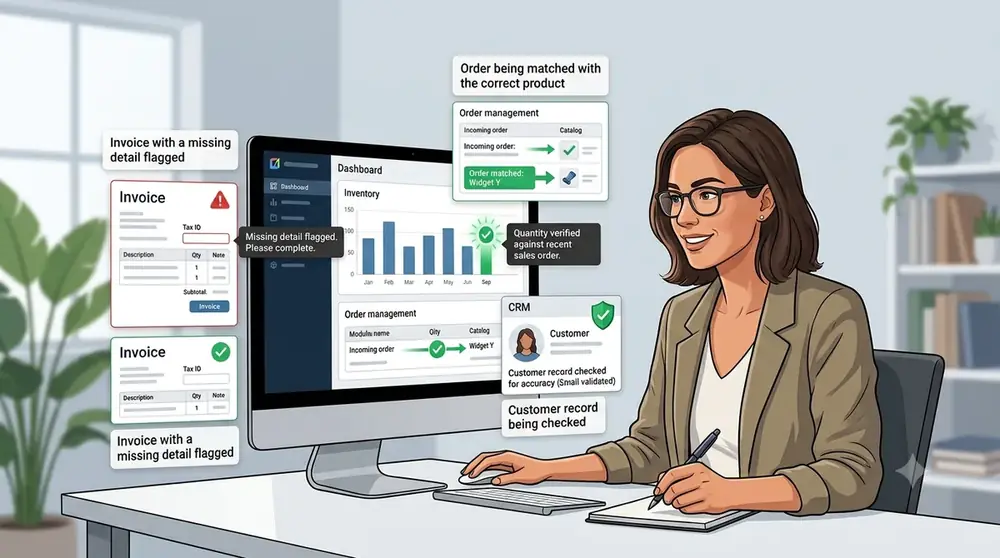
How Business Software Can Help Reduce Human Errors
Business software does not completely eliminate human error and mistakes. Instead, it reduces repetitive manual tasks, validates information, automates calculations and daily tasks, creates consistent workflows, and makes mistakes easier to detect.
Common examples of human error
Human error can include:
- An employee enters ₹5,000 instead of ₹500.
- A customer invoice contains the wrong quantity.
- Stock numbers are updated incorrectly.
- A payment is recorded twice.
- An employee forgets to follow up with a customer.
- A spreadsheet formula is accidentally changed.
- Information is copied incorrectly from one system to another.
The important part is that these errors aren't necessarily caused by carelessness. Workload, repetitive work, large amounts of data, time pressure, and manual data entry can all create opportunities for mistakes.
A recent accounting-software simulation that used acquired data found that the fit between the task and the technology used can have an important effect on preventing data-entry errors.
What Is Business Software?
What does business software help you manage?
Business software is an application used to automate, manage, and optimise business operations. It can help businesses track money, organise customer information, analyse business activity, manage credits, and perform many other tasks.
Examples include:
- Accounting software
- Inventory management software
- CRM software
- Billing and invoicing software
- Payroll software
- Project management software
- Customer support systems
- Business management and ERP software
These systems can reduce work stress and save time. More importantly, they can reduce errors by changing how work is performed rather than simply giving employees another place to enter information.
Automatic Calculations Reduce Calculation Mistakes
Use consistent rules for everyday calculations
Calculation mistakes are among the simplest errors that can occur during daily business operations. A person can make a wrong calculation or enter an incorrect number into a calculator or spreadsheet.
Imagine a shopkeeper is creating an invoice with a quantity of 10 and a unit price of ₹240. The correct total is ₹2,400. When the invoice is created manually, there is an opportunity to enter the wrong total, such as ₹2,200.
Business software can calculate the total automatically:
For example: 10 × ₹240 = ₹2,400.
It can also automatically calculate:
- Subtotal
- Discount
- Tax
- Final amount
- Payment received
- Remaining balance
This removes many opportunities for simple arithmetic and calculation mistakes.
A recent accounting-software simulation found that automated accounting software was faster and had fewer recording errors than manual spreadsheet-based recording in the tested scenario.
Data Validation Catches Incorrect Information
Data validation is important when storing customer information, creating invoices, or entering business records. Software can check whether entered information follows predefined rules before accepting it.
For example:
- Age: 25 – correct; "abc" – incorrect.
- Email: customer@example.com – correct; customerexample.com – incorrect.
- Quantity: 24 – correct; -50 – incorrect.
For an invoice:
- Quantity = 5
- Price = ₹200
- Software automatically calculates = ₹1,000
NIST defines data validation as determining whether data or a data-collection process is acceptable according to predefined tests.
Automation Reduces Repetitive Data Entry
Fewer handoffs mean fewer mistakes
Businesses often have repetitive tasks that are important but time-consuming. One of the biggest sources of errors is entering the same information repeatedly in different systems.
For example, without integrated software:
- Record the customer order.
- Update inventory.
- Create the invoice.
- Record the payment or account entry.
Every transfer creates another opportunity for information to be entered incorrectly.
With integrated business software:
- The system records the order.
- Inventory updates.
- The invoice is generated.
- The transaction is recorded.
Automation can therefore reduce the number of times employees have to manually copy the same information from one place to another.
Inventory Software Can Reduce Stock-Related Mistakes
Keep stock records in sync with sales
Inventory management becomes increasingly difficult as the number of products increases.
Imagine a store with 500 products. Every time something is sold, an employee may need to manually update a spreadsheet. Eventually, someone forgets to update it.
The spreadsheet might show that 15 units are available while only 3 units are actually on the shelf.
With an integrated inventory system, recording a sale or creating an invoice can automatically update the corresponding stock record.
This does not guarantee perfect inventory accuracy, but it reduces the number of manual updates employees have to remember.
Automated Reminders Reduce Forgotten Tasks
Use alerts for tasks that repeat
Not every human error is a typing or calculation mistake. Sometimes the problem is simply forgetting to complete an important task.
Examples include:
- Forgetting to send an invoice
- Forgetting a payment reminder
- Forgetting to reorder stock
- Forgetting a customer follow-up
- Forgetting a scheduled task
Business software can provide:
- Notifications
- Reminders
- Scheduled emails
- Recurring tasks
- Automatic alerts
These features do not remove humans from the process. Instead, they help prevent important tasks from being forgotten and make them easier to manage.
Software Makes Mistakes Easier to Detect
Use reports and alerts to find problems early
Reducing errors does not mean preventing every error. Business software can use validation rules, alerts, reports, and audit records to help identify potential problems before or after they occur.
Examples include:
- Unusual transaction alerts
- Duplicate invoices
- Stock discrepancies
- Missing information
- Failed payments
- Unusual expenses
- Incorrect totals
- Audit logs
Modern business software can therefore support both prevention and detection. Instead of relying entirely on employees to notice every problem manually, software can highlight information that needs attention.
Human + Software Is Better Than Software Alone
Keep people responsible for important decisions
The goal of business software should not be to replace people. In many situations, the strongest approach is a combination of human judgement and software automation.
| Humans | Software |
|---|---|
| Make decisions | Calculate |
| Handle unusual situations | Store information |
| Understand customers | Validate data |
| Check important information | Remind |
| Set business rules | Automate |
| Use judgement and experience | Track and report |
The best approach is to let people focus on tasks that require judgement, communication, experience, and human skills while software handles repetitive, rules-based work.
Conclusion
Human errors are a normal and common part of running a business, especially when employees and owners have to deal with repetitive tasks, calculations, data entry, and large amounts of information.
Business software can reduce many of these mistakes by automating repetitive work, checking information, performing calculations, updating records, and providing alerts when something needs attention.
However, business software does not completely eliminate human error. Incorrect information, poor configuration, or a lack of proper review can still cause problems. Software itself can also produce incorrect results when the information or rules behind it are wrong.
The goal is not to replace people or eliminate jobs. Instead, software can handle repetitive and rules-based tasks while people focus on decisions, reviews, customer relationships, and work that requires human judgement and skills.
Frequently Asked Questions
What is the most important first step?
Start with one clear, measurable improvement related to this topic, then review the result regularly.
How often should a small business review this?
A monthly review is a practical starting point. Review sooner when costs, customers, products, or processes change significantly.
Can software replace business judgment?
No. Software can organize information and automate repeatable work, but people should verify important information and make final decisions.
Article tags
QuickGENBiz
Turn good ideas into reliable workflows.
Manage invoices, inventory, customer credits, and business records from one practical platform.
Get started free